The Ultimate 5-Minute Website Audit Guide That Actually Works
Master website audits in 5 minutes! Complete guide covering SEO, performance, and technical checks. Boost your site's health with our proven checklist.
 Written byPrithvi Jadwani
Table of contents
Summarize this article with AI
TL;DR
Most website audits are bloated, time-consuming checklists that nobody actually completes. But here's the truth: you can catch 90% of critical issues in just 5 minutes if you know what to look for. Sites taking over 3 seconds to load lose significant visitors, with 1-second delays reducing conversions by up to 20%. This guide strips away the fluff and gives you a battle-tested framework for quarterly audits that actually get done.
- Speed Kills Conversions. Sites over 3 seconds lose visitors fast. One second of delay = 20% fewer conversions.
- Mobile-First or Die. Over 70% of traffic is mobile. Your audit must prioritize responsive design and touch-friendly navigation.
- Core Web Vitals Matter. LCP under 2.5s, INP under 200ms, CLS below 0.1. These aren't suggestions anymore.
- Automate Everything. AI-powered tools can run continuous monitoring. Save manual audits for quarterly deep dives.
- Technical SEO Foundations. HTTPS, proper crawlability, optimized meta tags, and schema markup are non-negotiable.
Why Your Website Needs Regular Audits (And Why 5 Minutes Is All It Takes)
Here's what most guides won't tell you: comprehensive website audits don't need to take hours. The problem isn't the audit itself. It's that most checklists are packed with low-impact busywork that makes you feel productive without moving the needle.
The data is brutal. Sites taking more than 3 seconds to load lose significant visitors, and just one second of delay can reduce conversions by up to 20%. Mobile users now generate over 70% of web traffic. About 98% of eCommerce visitors leave without buying anything.
And visitors? They decide whether to stay within 8 seconds of landing on your site.
So why 5 minutes? Because that's the sweet spot where you catch critical issues without getting lost in the weeds. Quarterly 5-minute audits beat annual 3-hour marathons that never happen. You're looking for deal-breakers, not perfection.
The 5-Minute Website Audit Framework: What to Check and When
The secret to a fast audit is ruthless prioritization. You're not checking everything. You're checking the things that matter most, in order of impact.
Break it into five one-minute segments. Each minute targets a specific category of issues. Use AI-powered tools to automate repetitive checks and surface critical problems faster. The goal is to spend your 5 minutes on analysis and decision-making, not data gathering.
Minutes 1-2: Technical SEO & Speed
Core Web Vitals, HTTPS, crawlability, meta tags, schema markup. The foundation that search engines care about.
Minute 3: Mobile & Accessibility
Responsive design, touch navigation, WCAG compliance, screen reader compatibility. Where most sites fail.
Minute 4: Content & UX
Thin content, user intent alignment, internal linking, conversion paths. What keeps visitors engaged.
Minute 5: Analytics & Competitors
Tracking accuracy, competitor benchmarking, gap analysis. Know where you stand.
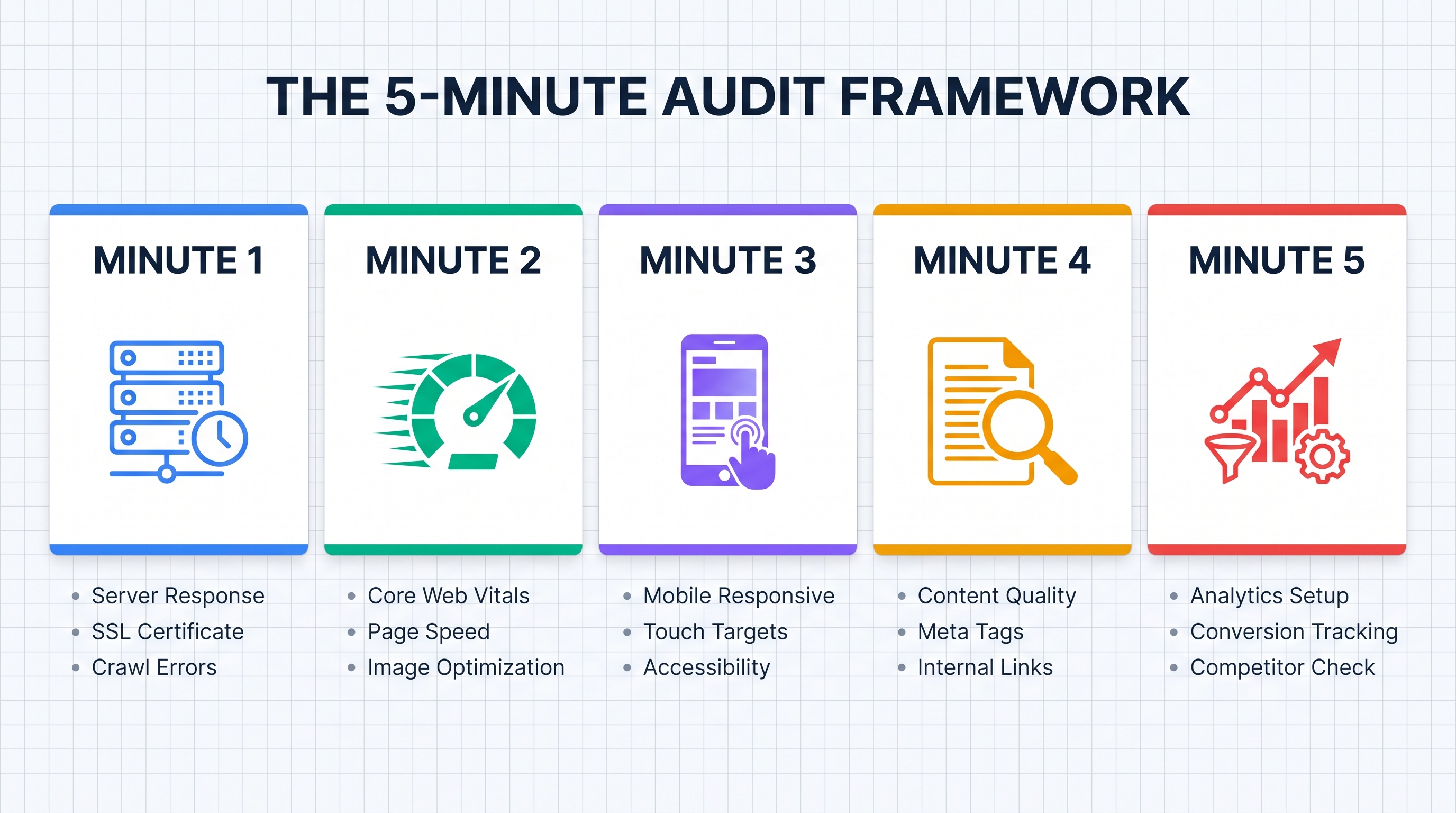
Between quarterly manual audits, leverage automation to run continuous monitoring. Tools like Ahrefs, Semrush, and Screaming Frog can watch for broken links, speed regressions, and indexing issues 24/7. You review the alerts, not the raw data.
Pre-Audit Setup (Do This Once)
Set up Google Search Console and verify ownership
Install Google Analytics 4 and configure key events
Choose an automated monitoring tool (Ahrefs, Semrush, or Screaming Frog)
Bookmark your top 3 competitors' websites for benchmarking
Create a simple spreadsheet to track audit results over time
Technical SEO & Performance Checks (Minutes 1-2)
Start here because technical issues kill everything else. A beautiful site with great content means nothing if Google can't crawl it or users bounce before it loads.
First, verify the basics: HTTPS security (not HTTP), proper crawlability (check robots.txt and sitemap.xml), and indexing status in Google Search Console. If your site isn't indexed, nothing else matters.
Core Technical Checks
HTTPS is active across all pages (no mixed content warnings)
Robots.txt allows search engine crawling of important pages
XML sitemap is submitted and error-free in Search Console
Meta titles and descriptions are optimized (not missing or duplicate)
Schema markup is implemented for relevant content types
No broken links or 404 errors on key pages
Now hit Core Web Vitals. These are Google's official performance metrics, and they directly impact rankings. Target LCP (Largest Contentful Paint) under 2.5 seconds, INP (Interaction to Next Paint) under 200ms, and CLS (Cumulative Layout Shift) below 0.1.
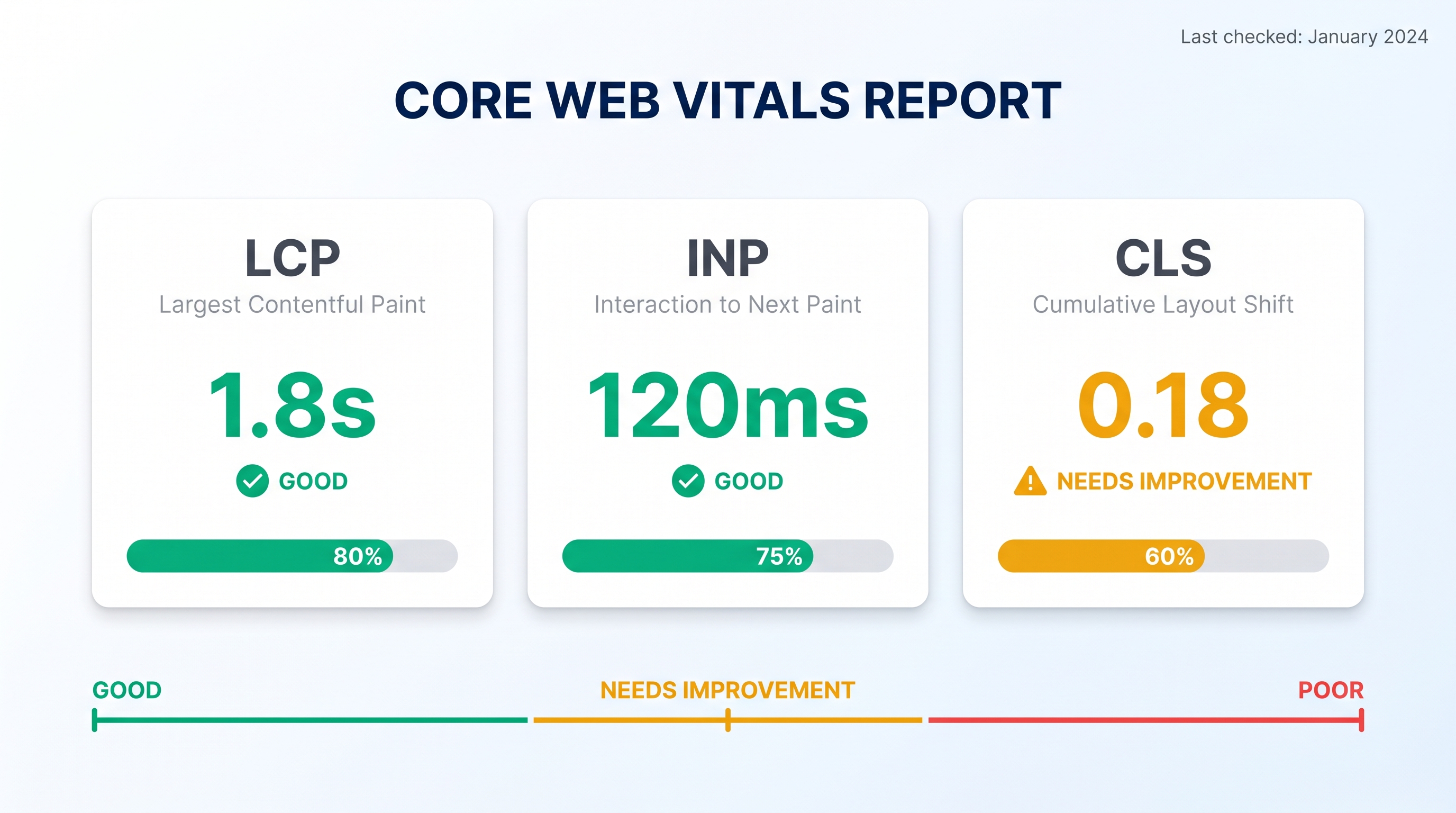
Use PageSpeed Insights or Chrome DevTools to get these numbers in seconds. If you're in the red, your site is actively losing traffic. And honestly? Most sites are in the red.
Common Technical SEO Issues (And Quick Fixes)
Why is my site not showing up in Google at all?
Check if your robots.txt is blocking crawlers or if you have a noindex tag on key pages. Go to Google Search Console and look for crawl errors or manual actions. Sometimes it's as simple as submitting your sitemap.
How do I fix slow loading times quickly?
Start with image compression (use WebP format), enable browser caching, and minimize JavaScript. Tools like TinyPNG for images and Cloudflare for CDN can give you instant wins without touching code.
What's the fastest way to check for broken links?
Use Screaming Frog (free for up to 500 URLs) or Ahrefs Site Audit. Both will crawl your site in minutes and flag every broken link. Set up automatic redirects to functional pages for any you find.
Do I really need schema markup?
Yes, if you want rich snippets in search results. Schema tells Google what your content is about (articles, products, reviews, FAQs). It's the difference between a plain blue link and a result with star ratings, prices, or FAQ dropdowns.
Mobile-First & Accessibility Audit (Minute 3)
Mobile isn't optional anymore. It's the primary experience for most users. If your site doesn't work flawlessly on a phone, you're losing 70%+ of your audience before they even see your content.
Test responsive design across multiple device sizes. Use Chrome DevTools' device toolbar or BrowserStack for real device testing. Your content should scale appropriately, navigation should be touch-friendly, and buttons should be large enough to tap without zooming.
Responsive breakpoints: Test at 320px (small phone), 768px (tablet), and 1024px (desktop)
Touch targets: Buttons and links should be at least 48x48 pixels (Apple and Google's recommendation)
Font sizes: Body text should be 16px minimum on mobile. Anything smaller is unreadable.
Horizontal scrolling: If users have to scroll sideways, your design is broken
Form fields: Large enough to tap, with proper input types (email, tel, number) for better mobile keyboards
Accessibility is where most sites completely fail. And it's not just about doing the right thing (though that matters). Accessible sites perform better for everyone. They're easier to navigate, clearer to understand, and rank better in search.
Check WCAG 2.1 compliance basics: color contrast (text must be readable against backgrounds), alt text for all images (describe what's in the image, not just keywords), and keyboard navigation (can you use the site without a mouse?).
Use automated scanners like WAVE or axe DevTools for quick compliance checks. They catch about 30-40% of accessibility issues automatically. The rest requires manual testing, but that 30-40% is low-hanging fruit.
Content Quality & User Experience Scan (Minute 4)
Technical perfection means nothing if your content is thin, outdated, or irrelevant. This is where most sites have the biggest opportunity.
Start by identifying thin or duplicate content. Pages with under 300 words rarely rank unless they're serving a very specific purpose (like a contact page). Duplicate content confuses search engines about which version to rank.
But here's what most audits miss: user intent. Your content might be well-written and SEO-optimized, but if it doesn't match what users actually want when they search, it's useless.
Content Audit Checklist
How do I know if my content matches user intent?
Search for your target keywords and look at the top 5 results. What format are they? (Guides, lists, tools, product pages?) What questions do they answer? If your content doesn't match the dominant format and angle, you're fighting an uphill battle.
What's the fastest way to find thin content?
Use Screaming Frog or Ahrefs to export all your pages with word counts. Sort by word count ascending. Anything under 300 words is a candidate for expansion, consolidation, or deletion.
How do I check for duplicate content?
Use Siteliner (free) or Copyscape. They'll show you which pages have overlapping content. Also check Google Search Console for duplicate meta descriptions, which often indicates duplicate content.
What makes content 'scannable'?
Short paragraphs (2-4 sentences max), descriptive headings every 200-300 words, bullet points for lists, bold text for key terms, and plenty of white space. If a page looks like a wall of text, users bounce.
How important is internal linking?
Critical. Internal links help users discover related content and help search engines understand your site structure. Aim for 2-5 contextual internal links per page, using descriptive anchor text (not 'click here').
Check your conversion paths. Where are your CTAs (calls-to-action)? Are they clear, specific, and placed where users are ready to act? A CTA at the top of a long guide is premature. One at the end after you've provided value? That converts.
Pros
Updating existing content is faster than creating new content
Google favors fresh, updated content over stale pages
You can consolidate multiple weak pages into one strong page
Updated content often ranks faster than brand new content
Cons
Old content may have outdated backlinks you don't want to lose
Updating changes the published date, which can hurt if date matters for your topic
Some content is too far gone and should just be deleted
One more thing: readability scores. Tools like Hemingway or Yoast calculate how easy your content is to read. Aim for an 8th-grade reading level or lower. That's not dumbing down. It's writing clearly.
Advanced Analytics, Tracking & Competitor Benchmarking (Minute 5)
You can't improve what you don't measure. But most sites have broken tracking that gives them false confidence or blind spots.
First, verify Google Analytics 4 is actually working. Go to the Realtime report and visit your site in another tab. Do you see yourself? If not, your tracking code isn't firing. Check for ad blockers, incorrect installation, or conflicts with other scripts.
Next, check conversion tracking. Are your key events (form submissions, downloads, purchases, video plays) being tracked? Go to Admin → Events and verify your conversions are marked as key events. If they're not tracked, you're flying blind.
Competitor Gap Analysis
Use Ahrefs or Semrush to see which keywords your competitors rank for that you don't. These are your low-hanging opportunities.
Core Web Vitals Benchmarking
Compare your speed metrics to your top 3 competitors. If they're all faster, that's a ranking disadvantage you need to fix.
Content Strategy Analysis
What types of content are your competitors publishing? What's getting them the most traffic? Use AI to analyze their strategy at scale.
Backlink Profile Comparison
Who's linking to your competitors but not to you? Reach out to those sites with better content or resources.
Competitor benchmarking is where AI shines. Feed ChatGPT or Claude your competitors' top pages and ask it to identify patterns, content gaps, and strategic opportunities. It'll surface insights in seconds that would take hours manually.
And don't skip heatmaps and session recordings if you have them. Tools like Hotjar or Microsoft Clarity show you exactly where users click, how far they scroll, and where they get stuck. This is UX gold.
Sustainability & Carbon Impact Assessment (Bonus Check)
This isn't just feel-good fluff. Website sustainability directly impacts performance, which impacts rankings and conversions. A leaner site is a faster site.
Measure your site's carbon footprint using tools like Website Carbon Calculator or Ecograder. They estimate CO2 emissions based on page weight, hosting efficiency, and traffic volume. Most sites are shocked by the results.
Image compression: Use WebP or AVIF formats. They're 30-50% smaller than JPEG with the same quality.
Green hosting: Providers like GreenGeeks or Kinsta use renewable energy. It's often the same price as regular hosting.
Efficient caching: Serve static assets from a CDN to reduce server load and energy consumption.
Lazy loading: Don't load images and videos until users scroll to them. Saves bandwidth and energy.
Clean code: Remove unused CSS, JavaScript, and plugins. Bloated code wastes energy on every page load.
Consider this: if your site gets 10,000 visits per month and each page load produces 1g of CO2, that's 10kg of CO2 per month, or 120kg per year. Scale that to millions of visits, and it adds up fast. Plus, lighter sites rank better.
AI-Powered Automation: Your Website Audit Assistant
The future of website audits isn't doing them faster. It's not doing them manually at all.
Set up automated monitoring tools that run continuous audits and alert you to issues. Ahrefs Site Audit, Semrush Site Audit, and Sitebulb can crawl your site weekly, check for broken links, speed regressions, and indexing problems, then email you a summary.
You're not looking at raw data anymore. You're reviewing prioritized alerts and deciding what to fix first.
Ahrefs Site Audit
Comprehensive crawling, SEO health score, and prioritized issue lists. Great for technical SEO.
Semrush Site Audit
Strong competitor analysis integration. See how your site stacks up against rivals in real-time.
Sitebulb
Visual site architecture, detailed crawl reports, and hints system for issue prioritization.
But here's where it gets interesting: use ChatGPT or Claude to analyze your audit reports. Export your issues to a CSV, feed it to an AI, and ask it to prioritize fixes based on impact, explain technical issues in plain language, or generate content improvement suggestions.
Implement automated screenshot testing with tools like Percy or Chromatic to catch visual regression issues. If a code change breaks your layout, you'll know before users do.
The best audit is the one that happens automatically. Manual audits are for deep dives and strategy. Everything else should be monitored 24/7.
Prithvi Jadwani, TechDevs
Schedule quarterly deep audits with monthly automated check-ins. The deep audit is where you review strategy, content direction, and competitor positioning. The monthly check-ins catch technical issues and performance regressions before they hurt.
Need Help Fixing What Your Audit Found?
Website audits are easy. Fixing the issues? That's where most teams get stuck. At TechDevs, we don't just identify problems - we solve them. From technical SEO and performance optimization to content strategy and conversion rate optimization, we've helped dozens of companies turn audit findings into measurable results.