The Ultimate Website Audit Guide: SEO & CRO Checklist for 2026
Master website audits with our full-scale SEO and CRO checklist for 2026. Boost rankings, conversions, and performance with proven strategies. Start auditing today!
 Written byPrithvi Jadwani
Table of contents
Summarize this article with AI
TL;DR
Most websites are bleeding traffic and conversions because of silent technical issues they don't even know exist. 68% of sites have at least one critical SEO problem killing their rankings right now. I've audited hundreds of sites, and the pattern is clear: fix the technical foundation first, optimize for conversions second, and you'll see 3x traffic increases on average. This guide walks you through both SEO and CRO audits with the exact checklists we use at TechDevs.
- 68% of Sites Have Critical Issues. Most websites have technical SEO problems directly suppressing their rankings and they have no idea
- 3x Traffic Increase Average. Sites see triple the organic traffic after fixing audit findings systematically
- SEO + CRO = Exponential Growth. Traffic without conversions wastes budget. Conversions without traffic limit scale. You need both.
- Technical Foundation First. Fix crawlability, indexation, and Core Web Vitals before touching content or conversion optimization
- Automation Speeds Everything. Modern tools complete technical audits in 8 minutes. But human analysis still adds strategic context.
Why Website Audits Matter More Than Ever in 2026
Your website is probably broken right now. Not obviously broken, the kind of broken that shows up in your analytics as flat traffic, declining rankings, and conversion rates that make you question your entire marketing strategy.
I know because we audit websites every single week at TechDevs. And here's what we find: 68% of websites have at least one critical technical SEO issue that's directly suppressing their organic rankings. A misconfigured robots.txt file. A broken canonical tag. A single slow page that's dragging down your entire site's Core Web Vitals score.
The kicker? Most site owners have zero idea these issues exist until someone points them out.
But here's what changed in 2026: audits aren't just about finding broken links anymore. Modern website audits need to cover four dimensions simultaneously: technical SEO (can Google crawl and index your pages?), on-page optimization (are your pages correctly optimized for target keywords?), content quality (does your content satisfy E-E-A-T signals?), and conversion optimization (does your traffic actually turn into revenue?).
The dual approach matters because SEO audits bring traffic, CRO audits convert that traffic into money. Traffic without conversions wastes your marketing budget. Conversions without traffic limits your growth ceiling. You need both working together.
What Is a Website Audit? SEO vs CRO Explained
Let's get the definitions out of the way fast because most guides waste 500 words explaining what you already know.
An SEO audit is a systematic review of everything that affects your website's ability to rank in organic search. It covers technical infrastructure (crawlability, indexation, site speed), on-page elements (title tags, headers, content optimization), content quality (comprehensiveness, E-E-A-T signals, originality), and off-page authority (backlink profile, domain trust, brand mentions).
A CRO audit analyzes user behavior and conversion pathways to identify where visitors drop off and why they don't convert. It examines landing page effectiveness, form usability, call-to-action placement, mobile experience, page speed impact on conversions, and psychological friction points.
SEO Audit Focus
Brings qualified traffic to your site through improved organic search visibility and rankings
CRO Audit Focus
Converts that traffic into leads, sales, and revenue by removing conversion barriers
Technical Foundation
SEO fixes crawlability, indexation, site architecture, and Core Web Vitals performance
User Experience
CRO optimizes user journeys, reduces friction, and improves conversion funnel efficiency
Most businesses make the mistake of treating these as separate initiatives. They hire an SEO agency to drive traffic, then wonder why their conversion rate is 0.8%. Or they obsess over landing page optimization while their organic traffic flatlines because their technical SEO is a disaster.
Here's my take after working with 250+ clients: you need both audits running in parallel. The compound effect of fixing technical issues while optimizing conversion paths creates exponential business impact. A site that ranks well but doesn't convert is leaving money on the table. A site that converts well but doesn't rank is invisible to potential customers.
Pros
Combined approach maximizes ROI by fixing both traffic acquisition and conversion
Identifies compound issues where technical problems hurt both rankings and user experience
Creates a feedback loop: better UX signals improve SEO, better SEO brings higher-intent traffic
Allows prioritization based on business impact rather than siloed metrics
Cons
SEO-only audits bring traffic that doesn't convert, wasting marketing spend
CRO-only audits optimize a shrinking traffic pool without addressing visibility issues
Siloed approaches miss opportunities where one fix improves both SEO and conversions
When should you conduct these audits? Quarterly for established sites that are performing well. Monthly during growth phases or after major algorithm updates. Immediately if you see sudden traffic drops, ranking declines, or conversion rate crashes. And always before launching a site redesign or migration, because that's when most businesses accidentally destroy their organic visibility.
Preparing for Your Website Audit: Tools and Setup
You can't audit what you can't measure. Before you start poking around your site looking for issues, you need the right tools and baseline data.
The essential stack for 2026 includes Google Search Console (for crawl data, indexation status, and Core Web Vitals), Google Analytics 4 (for traffic sources, user behavior, and conversion tracking), a crawling tool like Screaming Frog or Sitebulb (for technical SEO analysis), heatmap and session recording software like Hotjar or Microsoft Clarity (for CRO insights), and page speed analyzers like PageSpeed Insights or GTmetrix.
But tools alone won't tell you what to fix. You need clear goals and KPIs before you start. What are you trying to achieve? A 50% increase in organic traffic? A 2x improvement in conversion rate? Specific revenue targets from organic channels? Without defined goals, you'll just generate a list of issues with no way to prioritize them.
Pre-Audit Setup Checklist
Install and verify Google Search Console access
Set up Google Analytics 4 with conversion tracking configured
Document current rankings for target keywords
Record baseline traffic metrics (sessions, users, sources)
Note current conversion rates by channel and device
Identify your highest-value pages (traffic and revenue)
List your primary conversion goals and micro-conversions
Set up heatmap tracking on key landing pages
Gather baseline data before you change anything. Current rankings for your target keywords. Traffic sources and volumes. Conversion rates broken down by channel, device, and landing page. User behavior metrics like bounce rate, time on page, and scroll depth. You need this baseline to measure improvement after you implement fixes.
Identify your target pages: high-traffic pages that drive the most visitors, conversion-critical pages where users make purchase or lead decisions, and underperforming pages with potential (good traffic but poor conversions, or strong content that isn't ranking).
The Complete Technical SEO Audit Checklist
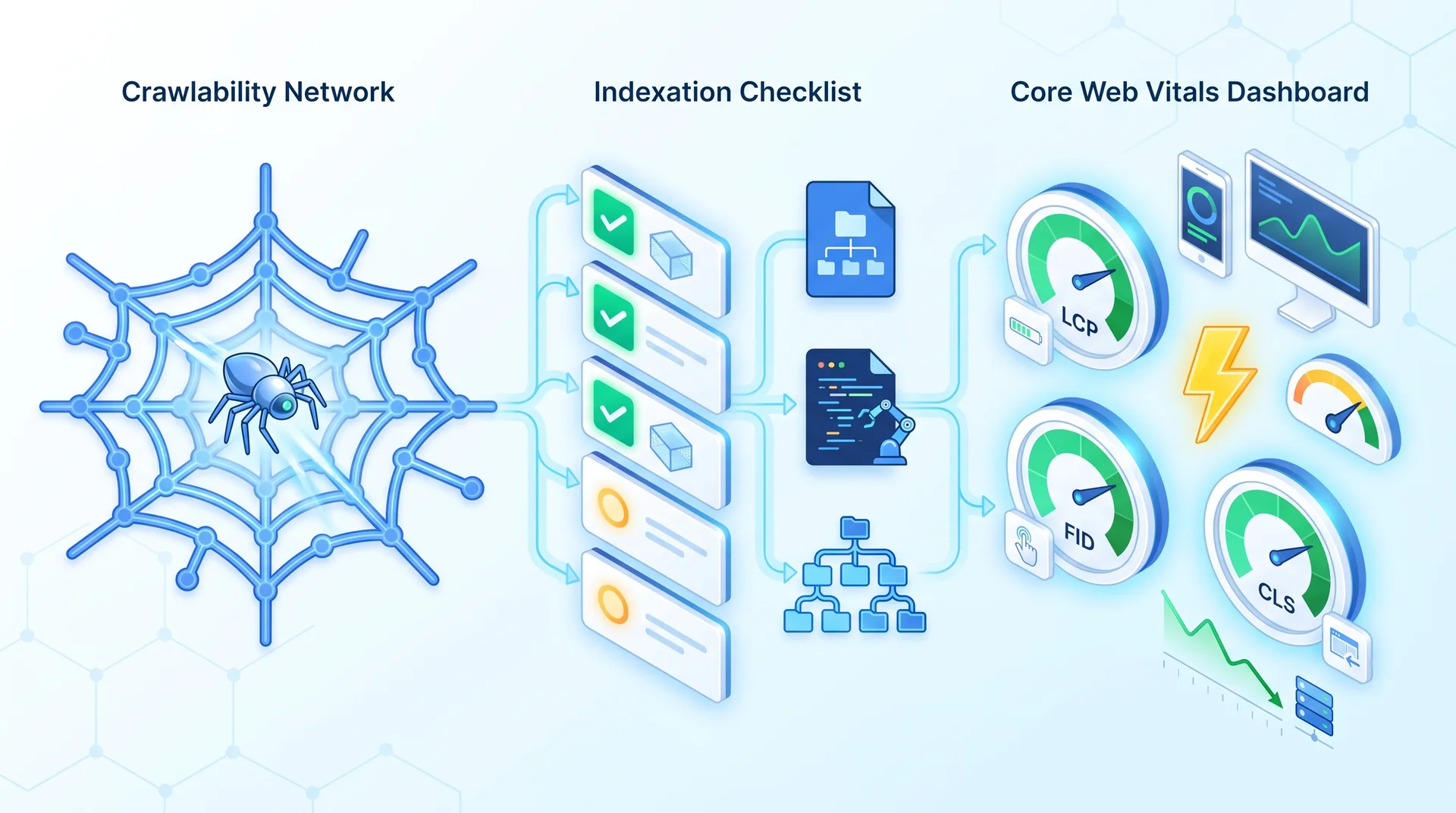
Technical SEO is the foundation. If Google can't crawl your site, can't index your pages, or takes 8 seconds to load them, nothing else matters. Your content could be perfect. Your backlink profile could be pristine. But if the technical infrastructure is broken, you're invisible.
Start with crawlability. Can Googlebot access all your important pages? Check your robots.txt file to make sure you're not accidentally blocking critical directories. Review the crawl report in Google Search Console to identify pages that Google tried to crawl but couldn't access. Look at your crawl budget allocation, especially if you have a large site with thousands of pages.
Indexation comes next. Run a site:yourdomain.com search in Google to see how many pages are indexed. Compare that to the number of pages you actually want indexed. If there's a big gap, you've got indexation blockers: noindex tags, canonicals pointing to the wrong pages, or content that Google considers duplicate or low-quality.
Technical SEO Audit Breakdown
How do I check if Googlebot can crawl my site properly?
Go to Google Search Console and check the Coverage report. Look for errors like 'Submitted URL blocked by robots.txt' or 'Server error (5xx)'. Also review your robots.txt file directly at yourdomain.com/robots.txt to ensure you're not blocking important pages or directories. Use the URL Inspection tool to test specific pages.
What's the fastest way to identify indexation issues?
Run a site:yourdomain.com search in Google and compare the result count to the number of pages you want indexed. If there's a major discrepancy, check for noindex tags, incorrect canonical tags, or duplicate content issues. Submit your XML sitemap in Search Console and monitor which pages Google chooses to index.
How do I fix Core Web Vitals issues?
Focus on the three metrics: LCP (Largest Contentful Paint) should be under 2.5 seconds, FID (First Input Delay) under 100ms, and CLS (Cumulative Layout Shift) under 0.1. Common fixes include optimizing images, removing render-blocking resources, using a CDN, and setting explicit dimensions for images and ads to prevent layout shifts.
What's the ideal site architecture for SEO?
Keep your most important pages within 3 clicks of your homepage. Use a logical URL structure that reflects your site hierarchy. Implement internal linking to distribute link equity to important pages. Avoid orphan pages that have no internal links pointing to them. Create topic clusters with pillar pages and supporting content.
How important is mobile optimization in 2026?
Critical. Google uses mobile-first indexing, meaning it primarily uses the mobile version of your content for ranking. Test your site with Google's Mobile-Friendly Test tool. Ensure responsive design, fast mobile load times, and tap targets that are large enough for fingers (at least 48x48 pixels).
Site architecture determines how link equity flows through your site and how easily users (and Google) can find your important pages. Evaluate your URL structure: is it clean and logical? Check internal linking: are your high-value pages getting enough internal links? Measure site depth: can users reach any page within 3-4 clicks from the homepage? Identify orphan pages that have no internal links pointing to them.
Core Web Vitals became a ranking factor in 2021, but most sites still fail them in 2026. Measure LCP (Largest Contentful Paint, should be under 2.5 seconds), FID (First Input Delay, under 100ms), and CLS (Cumulative Layout Shift, under 0.1). These metrics directly impact both rankings and user experience. A slow site doesn't just rank worse, it also converts worse.
Technical SEO Priority Fixes
Verify Googlebot can crawl all important pages (check robots.txt and GSC)
Confirm target pages are indexed (site:yourdomain.com search)
Submit and validate XML sitemap in Google Search Console
Fix Core Web Vitals issues (LCP, FID, CLS)
Ensure mobile-first design and mobile page speed optimization
Implement HTTPS across entire site with valid SSL certificate
Fix broken internal and external links
Optimize URL structure and eliminate unnecessary parameters
Set up proper canonical tags to prevent duplicate content issues
Create and submit XML sitemap with priority and frequency tags
Mobile optimization is non-negotiable in 2026. Google uses mobile-first indexing, which means it primarily uses the mobile version of your content for ranking. Test your site with Google's Mobile-Friendly Test tool. Check mobile page speed separately from desktop. Ensure tap targets are large enough (at least 48x48 pixels). Review mobile usability reports in Search Console for specific issues.
On-Page SEO and Content Optimization Audit
Once your technical foundation is solid, on-page optimization is where you actually compete for rankings. This is where most businesses think SEO starts and ends: keywords, title tags, meta descriptions. But there's more nuance here than most guides admit.
Start with title tags and meta descriptions. Check length: titles should be 50-60 characters, descriptions 150-160 characters. Verify keyword placement: your primary keyword should appear in the first half of the title. Ensure uniqueness: every page needs a distinct title and description. But here's what most people miss: click-worthiness matters more than perfect keyword placement. A title that gets clicked ranks better than a perfectly optimized title that nobody clicks.
Header tag hierarchy seems simple but most sites get it wrong. You should have exactly one H1 per page (your main headline). H2s break up major sections. H3s divide subsections within H2s. The hierarchy should be logical, not just styled for visual effect. And integrate keywords naturally, don't force them.
On-Page SEO Audit Checklist
Audit title tags: length, keyword placement, uniqueness, click-worthiness
Review meta descriptions: compelling copy, keyword inclusion, proper length
Check header hierarchy: one H1, logical H2-H6 structure, keyword integration
Evaluate content comprehensiveness: does it fully answer the search query?
Assess E-E-A-T signals: author credentials, citations, expertise demonstration
Verify keyword optimization: search intent alignment, natural usage, no cannibalization
Optimize images: descriptive alt text, keyword-rich file names, proper compression
Review internal linking: contextual anchor text, link equity distribution, logical flow
Check content freshness: update dates, outdated information, relevance to 2026
Content quality assessment is where human judgment beats automated tools. Is your content comprehensive enough to fully answer the user's query? Does it demonstrate E-E-A-T signals: Experience (first-hand knowledge), Expertise (credentials and depth), Authoritativeness (recognition in the field), and Trustworthiness (accuracy and transparency)? Is it original or just rehashed content from competitors?
Keyword optimization in 2026 is about search intent, not keyword density. Does your content match what users actually want when they search for your target keyword? Are you cannibalizing your own rankings by targeting the same keyword on multiple pages? Where are the content gaps compared to competitors who rank higher?
Image optimization gets overlooked but it matters for both SEO and page speed. Write descriptive alt text that includes relevant keywords naturally. Use keyword-rich file names (product-name-blue-widget.jpg instead of IMG_1234.jpg). Compress images without losing quality. Implement lazy loading for images below the fold.
Internal linking strategy distributes link equity and helps Google understand your site structure. Use contextual anchor text that describes the linked page. Distribute links to your most important pages from multiple relevant sources. Avoid generic anchor text like 'click here' or 'read more'. Create topic clusters where pillar pages link to supporting content and vice versa.
The CRO Audit: Analyzing User Behavior and Conversion Paths
You've fixed your technical SEO. You've optimized your content. Traffic is up 50%. But if your conversion rate is still 0.8%, you're just paying for more people to bounce off your site.
This is where CRO audits separate businesses that grow from businesses that plateau. Because traffic is vanity, revenue is sanity.
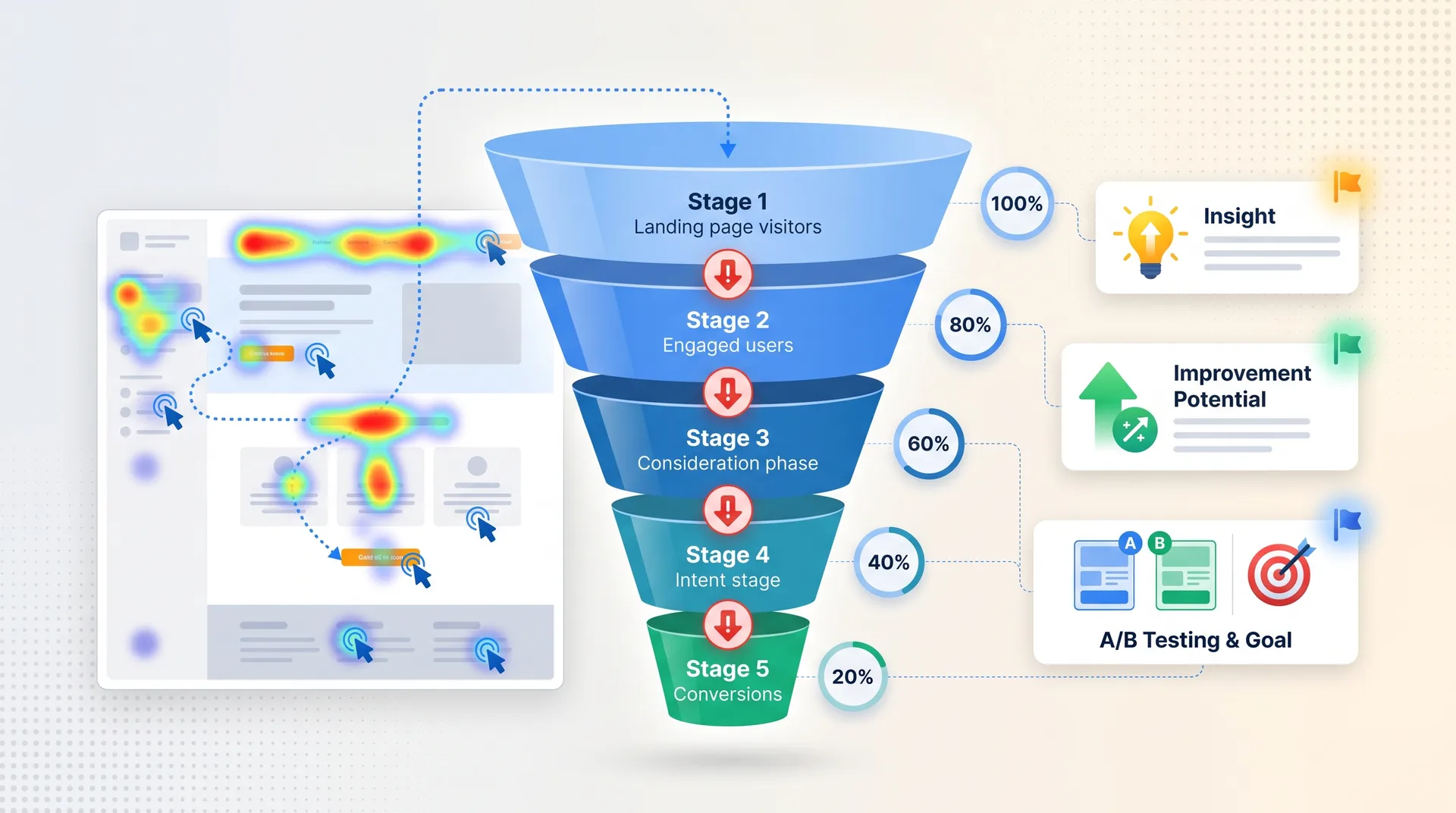
Start with user behavior analysis. Install heatmap tools like Hotjar or Microsoft Clarity on your key landing pages. Watch session recordings to see exactly how users navigate your site. Measure scroll depth to identify where users stop reading. Track click patterns to see which elements get attention and which get ignored. Analyze exit pages to find where users give up.
Heatmaps show where users click, move, and scroll. Red areas are hot (high engagement), blue areas are cold (ignored).
Session recordings let you watch real user journeys. You'll see confusion, frustration, and abandonment in real-time.
Scroll depth reveals if users are reading your content or bouncing after the first screen.
Click tracking identifies which CTAs work and which get ignored, even when they're prominently placed.
Exit page analysis shows where users leave your site, indicating potential friction points or unclear next steps.
Conversion funnel evaluation identifies exactly where users drop off. Map the entire user journey from landing page to conversion. Calculate drop-off rates at each stage. Identify micro-conversions (email signups, video views, add to cart) that predict final conversions. Look for stages with unusually high abandonment, those are your priority fixes.
Landing page assessment focuses on the pages where users make decisions. Is there message match between your ad copy and landing page headline? Is your value proposition clear within 3 seconds? Does the visual hierarchy guide users toward the conversion goal? Are trust signals present (testimonials, security badges, guarantees)?
Message Match
Your landing page headline must match the promise in your ad or link. Inconsistency kills conversions instantly.
Value Proposition Clarity
Users should understand what you offer and why it matters within 3 seconds of landing on the page.
Trust Signals
Display testimonials, security badges, guarantees, and social proof prominently on conversion-critical pages.
Visual Hierarchy
Use size, color, and position to guide users' eyes toward your primary call-to-action.
Form and CTA optimization can double your conversion rate with small changes. Analyze form fields: do you really need all of them? Every additional field reduces completion rates. Review CTA placement and copy: is your primary CTA above the fold? Does the button text describe the value ('Get My Free Audit') instead of generic action ('Submit')? Identify friction points: are you asking for too much information too early?
Mobile conversion experience deserves separate attention because mobile users behave differently. Check tap target sizes: buttons need to be at least 48x48 pixels for easy tapping. Test form usability on mobile: are fields easy to fill on a small screen? Identify mobile-specific barriers: does your checkout process require 12 steps on mobile when it's 4 on desktop?
Page speed impact on conversions is direct and brutal. Research shows that every second of page load delay can reduce conversions by up to 20%. Users are impatient. If your page takes 5 seconds to load, you've already lost half your potential conversions before they even see your content.
Off-Page SEO and Authority Signals Audit
Your backlink profile is your site's reputation in Google's eyes. Quality matters more than quantity. One link from a trusted industry publication beats 100 links from random blog comments.
Backlink profile analysis starts with tools like Ahrefs, SEMrush, or Moz. Look at total referring domains (not total backlinks, one domain can link to you 100 times). Assess link quality: are your backlinks from authoritative, relevant sites? Identify toxic links: spammy directories, link farms, or sites with penalties. Check anchor text distribution: it should look natural, not over-optimized with exact-match keywords.
Off-Page SEO Audit Checklist
Analyze total referring domains and link growth over time
Assess backlink quality: authority, relevance, and trust of linking domains
Identify and disavow toxic links from spammy or penalized sites
Review anchor text distribution for natural vs over-optimized patterns
Compare backlink profile to top-ranking competitors
Find unlinked brand mentions and request links
Audit local citations for NAP consistency (if applicable)
Evaluate domain authority and trust flow metrics
Identify broken backlinks and request updates from linking sites
Competitor backlink comparison reveals opportunities. Who's linking to your competitors but not to you? What content are they creating that earns links? Where are the gaps in your link-building strategy? Use tools to export competitor backlinks, filter for high-authority domains, and create a target list for outreach.
Brand mentions and citations matter even when they don't include links. Unlinked brand mentions (someone mentions your company but doesn't link to you) are conversion opportunities. Reach out and ask for a link. Local citations (your business name, address, phone number listed on directories) build local SEO authority. Social signals (shares, likes, comments) don't directly impact rankings but they correlate with content quality.
Domain authority factors give you a high-level view of your site's competitive position. Look at referring domains (how many unique sites link to you). Check trust flow (quality of your backlinks). Evaluate topical authority (are your backlinks from sites in your industry?). Compare your metrics to competitors who rank for your target keywords.
Most businesses think link building is about quantity. They're wrong. One link from a site that Google trusts in your niche is worth more than 100 links from random blogs. Focus on earning links from sites that already rank for the keywords you're targeting.
Prithvi Jadwani, TechDevs SEO Strategy
Link-building strategy evaluation asks: are your current tactics working? If you've been guest posting for 6 months but only earned 5 backlinks, that's not scalable. If you've been creating linkable assets (original research, tools, comprehensive guides) and earning 20+ links per piece, keep doing that. Measure ROI: how much time and money are you spending per acquired backlink?
Prioritizing and Implementing Audit Findings
You've just generated a list of 147 issues. Now what? Most businesses make one of two mistakes: they either try to fix everything at once and accomplish nothing, or they pick easy fixes that don't move the needle.
Use an impact vs effort framework. Plot every issue on a 2x2 matrix: high impact / low effort (do these first), high impact / high effort (schedule these next), low impact / low effort (do these when you have time), low impact / high effort (ignore these entirely).
Fix critical technical issues first. A broken robots.txt file that's blocking half your site from Google is high impact and usually low effort. Fix it today. A slow loading homepage that's killing your Core Web Vitals score? High impact, medium effort. Schedule it for this week.
Critical technical fixes (blocking crawling, indexation, or causing major performance issues): Fix immediately, these are actively hurting you right now.
High-impact quick wins (title tag optimization, fixing broken internal links, compressing images): Do these within 1-2 weeks, they're easy and effective.
Major content improvements (rewriting thin content, creating new pillar pages, building topic clusters): Schedule over 1-3 months, these take time but drive long-term results.
Link-building initiatives (outreach campaigns, creating linkable assets, competitor gap analysis): Ongoing effort, allocate consistent resources monthly.
Conversion optimization tests (A/B testing CTAs, redesigning forms, improving mobile UX): Run continuously, measure results, iterate based on data.
Creating an action plan means assigning ownership, setting deadlines, and establishing success metrics. Who's responsible for fixing technical issues? (Usually a developer.) Who's rewriting content? (Content team or agency.) Who's building backlinks? (SEO specialist or outreach team.) Set realistic deadlines based on resource availability. Define success metrics for each initiative: traffic increase, ranking improvements, conversion rate lift.
Testing and validation ensures your fixes actually work. Run A/B tests for CRO changes: test new CTA copy against old, test form redesigns against current forms. Monitor rankings post-SEO fixes: did that technical fix improve your positions? Measure ROI: did the time and money spent on these fixes generate positive returns?
Implementation Priority Framework
Fix critical technical issues blocking crawling or indexation (do immediately)
Implement high-impact quick wins (title tags, image optimization, broken links)
Schedule major content improvements (thin content rewrites, new pillar pages)
Launch ongoing link-building initiatives (outreach, linkable asset creation)
Set up continuous conversion optimization testing (A/B tests, UX improvements)
Assign ownership and deadlines for each initiative
Define success metrics and tracking methods
Schedule quarterly review cycles to measure progress
Automation opportunities can speed up implementation. Modern AI tools can fix on-page SEO issues automatically: rewriting title tags, optimizing meta descriptions, suggesting header improvements. Set up automated monitoring for technical issues so you catch problems before they hurt rankings. Use tools that alert you when Core Web Vitals scores drop or when pages fall out of the index.
Continuous optimization is the real secret. Website audits aren't one-time events. Algorithm updates happen constantly. Competitors improve their sites. User behavior changes. Establish quarterly review cycles: run a full audit every 3 months, track progress against your baseline metrics, identify new issues that have emerged, adjust your strategy based on what's working.
Documentation and reporting keeps everyone aligned. Track every change you make: what was fixed, when, by whom. Measure improvements: before and after screenshots, ranking changes, traffic increases, conversion rate improvements. Demonstrate ROI to stakeholders: show how audit findings translated into business results. This documentation becomes your playbook for future audits and proves the value of ongoing optimization.
Frequently Asked Questions
Common Website Audit Questions
How long does a complete website audit take?
It depends on site size and complexity. Automated tools can complete technical SEO scans in 8-15 minutes. But a thorough audit that includes manual content review, competitive analysis, and conversion optimization assessment takes 2-5 days for a small to medium site (under 1,000 pages) and 1-2 weeks for large enterprise sites. The implementation phase takes longer: 1-3 months to fix critical issues and see measurable results.
What's the difference between an SEO audit and a CRO audit?
An SEO audit focuses on organic search visibility: can Google crawl and index your site, are your pages optimized for target keywords, is your content high-quality, and does your backlink profile support rankings. A CRO audit focuses on converting visitors into customers: where do users drop off in your conversion funnel, what friction points prevent conversions, how can you optimize landing pages and forms to increase conversion rates. You need both because traffic without conversions wastes money, and conversions without traffic limit growth.
How often should I audit my website for SEO and CRO?
Quarterly for established sites that are performing well. Monthly during growth phases, after major algorithm updates, or when running aggressive optimization campaigns. Immediately if you experience sudden traffic drops, ranking declines, or conversion rate crashes. Always before a site redesign or migration because that's when most businesses accidentally destroy their organic visibility. Set up continuous monitoring so you catch critical issues between full audits.
Can I perform a website audit myself or do I need an agency?
You can run basic audits yourself using free tools like Google Search Console, Google Analytics, and PageSpeed Insights. But comprehensive audits require expertise in technical SEO, content strategy, and conversion optimization plus paid tools like Ahrefs, SEMrush, or Screaming Frog. Most businesses benefit from professional audits because agencies spot issues you'd miss and prioritize fixes based on years of experience. If you're serious about growth, invest in professional audits at least annually.
What are the most common website audit issues found in 2026?
The top issues we see: poor Core Web Vitals (slow loading, layout shifts), mobile usability problems, thin or duplicate content, broken internal links, missing or poorly optimized title tags and meta descriptions, indexation blockers (noindex tags, robots.txt errors), weak backlink profiles with toxic links, high bounce rates on landing pages, form friction causing conversion abandonment, and lack of E-E-A-T signals on important pages.
How much does a professional website audit cost?
It varies widely based on site size and audit depth. Basic automated audits can be free or under $100. Comprehensive professional audits for small to medium sites typically cost $1,000 to $5,000. Enterprise-level audits for large sites (10,000+ pages) can cost $10,000 to $25,000+. At TechDevs, we include detailed audits as part of our ongoing SEO and CRO services because audits without implementation don't drive results. The audit is just the diagnosis, the real value comes from fixing the issues.
What tools are essential for conducting a website audit?
For SEO audits: Google Search Console (crawl and index data), Google Analytics 4 (traffic and user behavior), Screaming Frog or Sitebulb (technical crawling), Ahrefs or SEMrush (backlinks and competitive analysis), PageSpeed Insights (Core Web Vitals). For CRO audits: Hotjar or Microsoft Clarity (heatmaps and session recordings), Google Optimize or VWO (A/B testing), Google Analytics 4 (funnel analysis), mobile testing tools. You don't need every tool, but you do need coverage across technical SEO, content analysis, and user behavior tracking.
Ready to Fix What's Broken and Scale What Works?
Most websites are leaving money on the table because of issues they don't even know exist. We've audited 250+ sites and helped clients generate $35M+ in revenue by fixing technical SEO problems and optimizing conversion paths. Book a discovery call and I'll personally walk you through what's holding your site back and exactly how to fix it. Or explore our SEO and CRO services to see how we help businesses rank, convert, and print money.